> For the complete documentation index, see [llms.txt](https://docs.meshmorpher.com/llms.txt). Markdown versions of documentation pages are available by appending `.md` to page URLs; this page is available as [Markdown](https://docs.meshmorpher.com/studio-and-graph/sculpt/sculpt-mesh.md).
# Sculpt Mesh
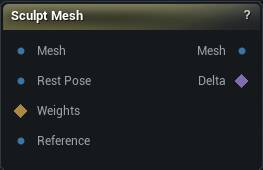
The Sculpt Mesh node
## When to use it
Sculpt a mesh by hand in the viewport. Select the node and the brushes appear; deselect it and they go away.
{% hint style="info" %}
Wire the unsculpted mesh into `Original` as well. That is what the Restore brush paints back toward, and what `Delta` is measured against.
{% endhint %}
## How to use it
{% stepper %}
{% step %}
### Wire a mesh into Mesh and select the node
{% endstep %}
{% step %}
### Pick a brush from the side panel and work in the viewport
{% endstep %}
{% step %}
### Press Accept
`Mesh` carries the result; `Delta` carries what you moved.
{% endstep %}
{% endstepper %}
## Pins
{% tabs %}
{% tab title="Inputs" %}
| Pin | Type | Description |
| ------------ | ---------- | ------------------------------------------------------------------------------------------------------------------------------------------- |
| `Mesh` | Mesh | The mesh you want to sculpt on. |
| `Original` | Mesh | The same mesh before you sculpted it. Delta is measured against this, and the Restore brush paints back toward it. |
| `Weights` | Weight Map | Where the brushes are allowed to bite: 1 is full strength, 0 is frozen, in between feathers. Leave it unconnected to sculpt the whole mesh. |
| `Reference` | Mesh | The surface the Project brush pushes vertices onto. The other brushes ignore it. |
| {% endtab %} | | |
{% tab title="Outputs" %}
| Pin | Type | Description |
| ------------- | ------ | ---------------------------------------------------------------------------------------------------------------- |
| `Mesh` | Mesh | The sculpted mesh, once you press Accept. |
| `Delta` | Deltas | How far each vertex moved from the original. Feed it to Apply Deltas to put the same change on a different mesh. |
| {% endtab %} | | |
| {% endtabs %} | | |
## Learn more
{% hint style="success" icon="circle-check" %}
Available in [**Mesh Morpher Graph**](https://meshmorpher.com/graph) and [**Mesh Morpher Studio**](https://meshmorpher.com/studio).
{% endhint %}